In this step, you select an analysis model for your report. You have the option to choose from either My Models (existing models) or to create a New Model.
My Models
Selecting and Applying a Text Analytics Model to Your Report
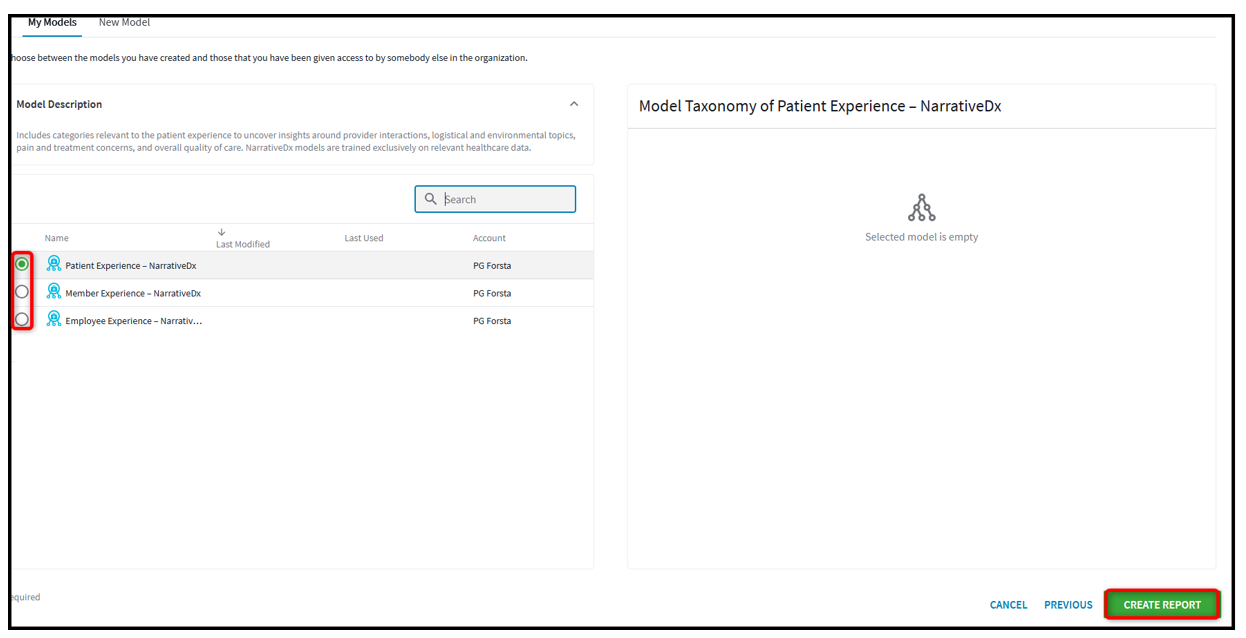
1. Click the radio button next to the model you'd like to apply to your text analytics report. The selected model will be highlighted in green.
2. Click the Create Report button after selecting a model to proceed. This will generate a report based on the model you've chosen.
 New Model
Use the “New Model” option to build a new model from one of our Flexible Standard Model templates, or start from scratch by choosing your own combination of pre-build categories and attributes from the Category Library.
Customizing an Existing Template
Selecting a Template to Customize
- Click “New Model” from the top menu.
- Click the check-box next to the template you want to customize.
- Click the Customize button in the right-hand menu, next to to the template name. This opens the category library.
Building a Model From Scratch
- Click “New Model” from the top menu.
- Click the + Build From Scratch button. This opens the category library.